From Systemd to Kubernetes: Running AI Workloads on K3s with ArgoCD GitOps
Migrating two vLLM models from bare systemd services to a production K3s cluster on the DGX Spark — with NVIDIA GPU Operator time-slicing, ArgoCD app-of-apps GitOps, kube-prometheus-stack monitoring, and Cloudflare Access + Auth0 SSO protecting five web dashboards.
Homelab Architecture
Deep-dives into the evolving architecture of a memory-driven AI homelab
From Systemd to Kubernetes: Running AI Workloads on K3s with ArgoCD GitOps
A week ago I wrote about running 24 containers, two local LLMs, and a knowledge graph on bare metal. The DGX Spark served Qwen3-32B and Qwen2.5-7B as systemd services — vllm-qwen3.service and vllm-router.service. That worked. It ran 24/7 without issue. But every new model meant writing another systemd unit, manually SSHing in to restart services, and hoping nobody bumped the wrong process while a 32B model was loading into GPU memory.
This post documents the migration from those bare systemd services to a production K3s cluster with ArgoCD GitOps, NVIDIA GPU Operator, full monitoring, and external access through Cloudflare Access with Auth0 SSO. Same hardware. Same models. Same ports. But now every change is a git commit, every deployment is declarative, and five web dashboards are accessible from anywhere with single sign-on.
Why Kubernetes on a Single Node?
The obvious question: why run Kubernetes on one machine? It’s not for horizontal scaling — there’s one DGX Spark and one GPU. It’s for everything else:
- Declarative state: The cluster’s desired state lives in two git repos.
kubectl applyorgit push— never SSH and pray. - Self-healing: If vLLM OOMs during inference, the pod restarts automatically. Systemd can restart too, but Kubernetes handles startup probes, health checks, and backoff with more granularity.
- GitOps: ArgoCD watches a repo and reconciles drift. Change a deployment manifest, push to main, and the cluster converges within 3 minutes. No CI/CD pipeline to build — ArgoCD is the pipeline.
- Observability: kube-prometheus-stack gives you Prometheus, Grafana, node-exporter, and DCGM GPU metrics out of the box. On systemd, monitoring meant manually scraping individual endpoints.
- Extensibility: The next model, the next service, the next experiment — it’s a YAML file in a git repo, not a systemd unit and a prayer.
The overhead of K3s on a 128GB machine with 20 ARM64 cores is negligible. The control plane uses ~400MB RAM. That’s a rounding error on a GB10.
Why K3s (Not MicroK8s)
I tried MicroK8s first. NVIDIA’s own documentation explicitly states the GPU addon is unsupported on ARM64. The addon fails to install the device plugin. K3s has documented successful GPU deployments on DGX Spark and ships a lightweight, single-binary server that plays well with ARM64.
K3s also integrates Traefik, CoreDNS, and metrics-server by default — three fewer Helm charts to deploy.
The Architecture
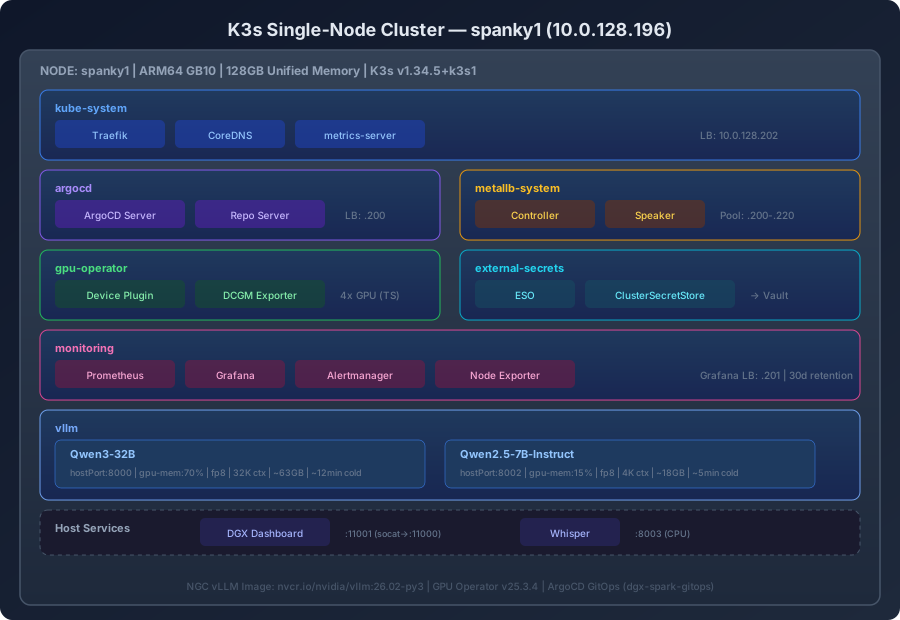
Cluster Layout
spanky1 (10.0.128.196) — K3s v1.34.5+k3s1
├── kube-system       Traefik (LB: 10.0.128.202), CoreDNS, metrics-server
├── argocd            ArgoCD server (LB: 10.0.128.200)
├── metallb-system    MetalLB controller + speaker (IP pool: .200-.220)
├── gpu-operator      Device plugin, DCGM exporter (4× time-sliced GPU)
├── external-secrets  ESO → Vault at 10.0.3.75
├── monitoring        Prometheus (30d, 50Gi), Grafana (LB: 10.0.128.201)
├── vllm              Qwen3-32B (:8000), Qwen2.5-7B (:8002) — 0 replicas, on-demand
└── openclaw          Gateway (:18789, LB: 10.0.128.203) — CPU-only, NFS data from tower
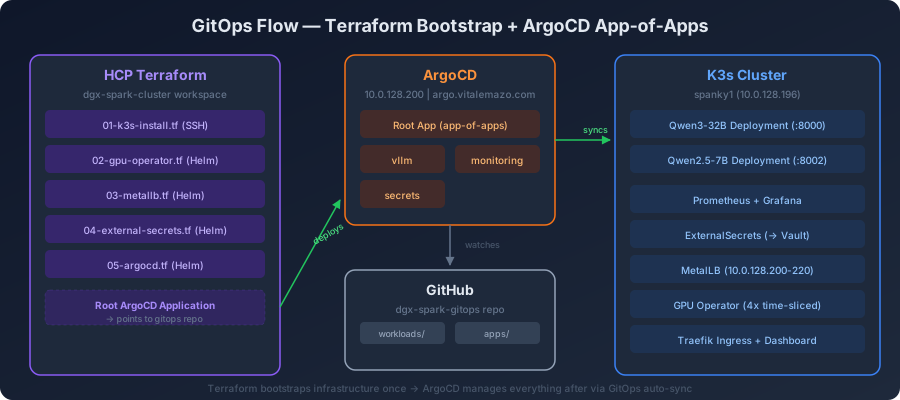
Two Repos, Clear Separation
| Repo | Purpose | Managed By |
|---|---|---|
vitalemazo/dgx-spark-cluster | K3s install, GPU Operator, MetalLB, ESO, ArgoCD (Helm releases) | HCP Terraform (workspace dgx-spark-cluster) |
vitalemazo/dgx-spark-gitops | ArgoCD Application definitions + all workload manifests | ArgoCD auto-sync |
Terraform runs once to bootstrap the cluster and platform services. After that, ArgoCD owns everything. Push a manifest change to dgx-spark-gitops, and ArgoCD applies it within 3 minutes. No Terraform runs for day-2 operations.
Part 1: K3s Bootstrap
Installation
K3s installs as a single binary via SSH from Terraform:
curl -sfL https://get.k3s.io | INSTALL_K3S_EXEC="server \
  --disable=servicelb \
  --disable=local-storage \
--write-kubeconfig-mode=644" sh ---disable=servicelb: MetalLB replaces K3s’s built-in ServiceLB. The built-in one only advertises the node IP — MetalLB allocates dedicated IPs from a pool, so ArgoCD, Grafana, and Traefik each get their own address.
--disable=local-storage: K3s ships a local-path-provisioner that we reinstall separately. Disabling and reinstalling gives us control over the StorageClass configuration for Prometheus’s 50Gi PersistentVolume.
The NVIDIA Runtime — Root Cause of Everything
This is the single most important configuration detail in the entire cluster. Get it wrong and every GPU workload fails silently — containers run, nvidia-smi shows the GPU inside the container, but torch.cuda.is_available() returns False.
The NVIDIA Container Toolkit installs /etc/containerd/conf.d/99-nvidia.toml, which defines an nvidia runtime. But it doesn’t make it the default. Pods without explicit runtimeClassName use runc — the standard container runtime that knows nothing about GPUs.
The fix is one line in the TOML:
[plugins."io.containerd.grpc.v1.cri"]
  default_runtime_name = "nvidia"
The full configure script also handles three K3s-specific issues:
- CNI binary path mismatch: The nvidia TOML import overrides the CRI config to look for CNI binaries at
/opt/cni/bin/, but K3s keeps them at/var/lib/rancher/k3s/data/cni/. Symlinks bridge the gap. - Flannel conflist path: Same issue — K3s flannel config lives under the K3s data directory, not
/etc/cni/net.d/where containerd expects it. - Containerd template: K3s uses
config.toml.tmplto generate its containerd config. The template needs animports = ["/etc/containerd/conf.d/*.toml"]line to pick up the nvidia drop-in.
Without all four fixes, you get a cluster where kubectl describe node shows nvidia.com/gpu: 4 (the device plugin found the GPU), but pods that request GPU resources silently run on CPU. The most dangerous kind of failure — everything looks right but nothing works.
Part 2: GPU Operator and Time-Slicing
Why Time-Slicing
The DGX Spark has one GB10 GPU with 128GB unified memory. NVIDIA MIG (Multi-Instance GPU) isn’t supported on this architecture. Time-slicing is the alternative — the GPU Operator advertises multiple virtual GPU slots that the Kubernetes scheduler treats as independent resources.
# GPU sharing configuration
devicePlugin:
  config:
    sharing:
      timeSlicing:
        resources:
          - name: nvidia.com/gpu
            replicas: 4
With replicas: 4, kubectl describe node shows:
Allocatable:
  nvidia.com/gpu: 4
Each pod requests nvidia.com/gpu: 1, so up to four pods can share the GPU concurrently. In practice, I run two (Qwen3-32B at 70% and Qwen2.5-7B at 15%), leaving headroom for future experiments without evicting production workloads.
The Memory Profiling Conflict
Time-slicing has a gotcha during initialization. When a vLLM instance starts, it profiles available GPU memory to determine how much it can allocate. If two vLLM pods start simultaneously — which happens on cluster boot — they both profile at the same time. One sees the full 128GB, allocates 70%. The other profiles while the first is still allocating and gets confused:
Error in memory profiling.
Initial free memory 46.87 GiB, current free memory 103.49 GiB
The solution is not elegant, but it works: let one crash-loop. The first pod to successfully profile gets the memory. The second pod’s container crashes, Kubernetes backs off, and on the next restart the first pod has stabilized. The second pod profiles correctly against the remaining memory and starts.
This typically resolves in 2-3 crash-loop iterations over ~5 minutes. A more sophisticated approach would be an init container with a distributed lock, but for two known pods on one node, crash-loop resolution is good enough.
GPU Operator Helm Values
The key insight for DGX Spark: the NVIDIA driver and toolkit are already installed on the host. The GPU Operator should not try to install them:
driver:
  enabled: false    # Driver 580.126.09 already on host
toolkit:
  enabled: false    # Container Toolkit 1.18.2 already installed
Leaving these enabled causes the Operator to deploy driver DaemonSets that fail on ARM64 Grace Blackwell, producing confusing error pods in the gpu-operator namespace.
Part 3: ArgoCD App-of-Apps
The Pattern
ArgoCD’s app-of-apps pattern uses one root Application that points to a directory containing other Application definitions. The root app is the only thing Terraform deploys — everything else is self-bootstrapping.
dgx-spark-gitops/
├── apps/
│   ├── root.yaml          # Root Application (deployed by Terraform)
│   ├── vllm.yaml          # → watches workloads/vllm/
│   ├── monitoring.yaml    # → watches workloads/monitoring/
│   └── secrets.yaml       # → watches workloads/secrets/
└── workloads/
    ├── vllm/
    │   ├── namespace.yaml
    │   ├── qwen3-32b-deployment.yaml
    │   ├── qwen3-32b-service.yaml
    │   ├── qwen25-7b-deployment.yaml
    │   └── qwen25-7b-service.yaml
    ├── monitoring/
    │   └── values.yaml
    └── secrets/
        ├── cluster-secret-store.yaml
        └── external-secrets/
Push a change to any file under workloads/ → ArgoCD detects drift → auto-sync applies the change → cluster converges. No kubectl apply. No SSH. No CI/CD.
Private Repo Access
ArgoCD needs to clone dgx-spark-gitops from GitHub. The repo is private, so ArgoCD gets a GitHub Personal Access Token stored in Vault at secret/k3s/argocd-github-token. The ESO ClusterSecretStore pulls it into a Kubernetes Secret that ArgoCD references in its repo configuration.
Part 4: Migrating vLLM from Systemd to Kubernetes
The Zero-Downtime Strategy
The existing systemd services bound to 10.0.128.196:8000 (Qwen3-32B) and :8002 (Qwen2.5-7B). Every downstream consumer — the Agent-API, OpenClaw, chat frontends — hits those IP:port combos.
The Kubernetes deployments use hostPort to bind the same ports:
ports:
  - containerPort: 8000
    hostPort: 8000     # Same as systemd service
    protocol: TCP
Migration strategy:
- Push vLLM manifests to gitops repo (pods stay
Pending— ports conflict with systemd) - Stop
vllm-router.service(7B, less critical) → K8s pod takes port 8002 - Verify:
curl http://10.0.128.196:8002/v1/models - Stop
vllm-qwen3.service(32B, primary) → K8s pod takes port 8000 - Verify:
curl http://10.0.128.196:8000/v1/models - Disable systemd services (keep unit files for rollback)
Downtime per model: ~60 seconds for the 7B, ~12 minutes for the 32B. The gap is model loading time on ARM64 unified memory — the 32B model takes approximately 12 minutes for a cold start with FP8 quantization.
Rollback: sudo systemctl enable --now vllm-qwen3.service — the systemd unit files are deliberately kept on disk.
The NGC Image
The community vllm/vllm-openai:latest image ships PyTorch with CUDA 12.9. The DGX Spark runs CUDA 13.0. This causes torch.cuda.is_available() to return False due to a CUDA version mismatch.
NVIDIA’s NGC image nvcr.io/nvidia/vllm:26.02-py3 is built for the GB10 architecture with the correct CUDA version. But it has its own quirk: the entrypoint is /opt/nvidia/nvidia_entrypoint.sh, which runs environment setup scripts and doesn’t pass through bare vLLM arguments correctly.
The fix: set an explicit command that bypasses the entrypoint:
command: ["vllm", "serve", "Qwen/Qwen3-32B"]
args:
  - --host
  - "0.0.0.0"
  - --port
  - "8000"
  - --quantization
  - fp8
  - --gpu-memory-utilization
  - "0.70"
  - --max-model-len
  - "32768"
  - --enforce-eager
  - --enable-auto-tool-choice
  - --tool-call-parser
  - hermes
  - --kv-cache-dtype
  - fp8
  - --attention-backend
  - TRITON_ATTN
Startup Probes — The Critical Detail
Model loading on ARM64 unified memory is slow. The 32B model takes ~12 minutes. The 7B takes ~5 minutes. Without a startupProbe, the default liveness probe kills the container after 30 seconds — long before the model is ready.
startupProbe:
  httpGet:
    path: /health
    port: 8000
  initialDelaySeconds: 120    # Wait 2min before first check
  periodSeconds: 10           # Check every 10s
  timeoutSeconds: 5
  failureThreshold: 90        # Allow up to 90 failures = 17min total
The startup probe gives the 32B model 120s + (90 × 10s) = 17 minutes to become healthy. Once the startup probe succeeds, the regular liveness and readiness probes take over with tighter thresholds.
For the 7B model: initialDelaySeconds: 60, failureThreshold: 40 → 7.5 minutes total budget.
Shared Resources
Both models mount the host’s HuggingFace cache to avoid re-downloading 30GB+ of model weights:
volumes:
  - name: hf-cache
    hostPath:
      path: /home/ghost/.cache/huggingface
      type: DirectoryOrCreate
  - name: dshm
    emptyDir:
      medium: Memory
      sizeLimit: 16Gi    # 32B needs significant /dev/shm
The dshm volume is critical — vLLM uses shared memory for tensor parallelism. Without it, the process gets the default 64MB /dev/shm and crashes during inference with large batch sizes.
Part 5: Platform Services
MetalLB — Real IPs for Real Services
K3s’s built-in ServiceLB only advertises the node IP with different ports. MetalLB allocates dedicated IPs from a configured pool, giving each LoadBalancer service its own address:
| IP | Service | DNS |
|---|---|---|
| 10.0.128.200 | ArgoCD | argo.int.vitalemazo.com |
| 10.0.128.201 | Grafana | grafana-spark.int.vitalemazo.com |
| 10.0.128.202 | Traefik Dashboard | traefik-spark.int.vitalemazo.com |
| 10.0.128.203-220 | Reserved | Future services |
MetalLB runs in L2 mode — the speaker pod responds to ARP requests for these IPs on the local network. No BGP router required.
External Secrets Operator → Vault
ESO connects to HashiCorp Vault (10.0.3.75:8200) using AppRole authentication. A ClusterSecretStore defines the Vault connection, and individual ExternalSecret resources sync specific paths into Kubernetes Secrets.
This keeps the GitOps repo clean — no secrets in git. ArgoCD commits reference ExternalSecret manifests; the actual values come from Vault at sync time.
Monitoring — kube-prometheus-stack
The monitoring namespace runs the full kube-prometheus-stack:
- Prometheus: 30-day retention with 50Gi PersistentVolume on local-path storage
- Grafana: LoadBalancer on 10.0.128.201, pre-loaded with GPU and node dashboards
- DCGM Exporter: Scrapes GPU metrics (utilization, memory, temperature, power) from the GPU Operator
- Node Exporter: Standard host metrics (CPU, memory, disk, network)
- Alertmanager: Ready for alert routing (currently notification-free — it’s a homelab)
Grafana auto-discovers Prometheus as a data source. The DCGM dashboard shows real-time GPU utilization per time-sliced instance — useful for tuning gpu-memory-utilization percentages between models.
Part 6: External Access — Cloudflare Tunnel + Auth0 SSO
Five Dashboards, One Auth Flow
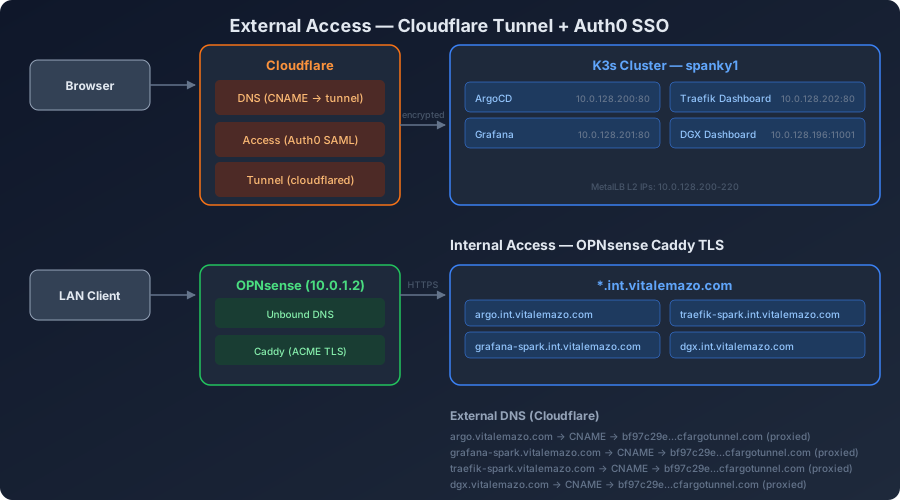
The cluster exposes five web dashboards — four new ones from this migration plus the existing DGX native dashboard:
| Dashboard | External URL | Internal URL | Auth |
|---|---|---|---|
| ArgoCD | argo.vitalemazo.com | argo.int.vitalemazo.com | Cloudflare Access + Auth0 |
| Grafana | grafana-spark.vitalemazo.com | grafana-spark.int.vitalemazo.com | Cloudflare Access + Auth0 |
| Traefik | traefik-spark.vitalemazo.com/dashboard/ | traefik-spark.int.vitalemazo.com/dashboard/ | Cloudflare Access + Auth0 |
| DGX Dashboard | dgx.vitalemazo.com | dgx.int.vitalemazo.com | Cloudflare Access + Auth0 |
| Whisper | — | 10.0.128.196:8003 | Internal only |
Cloudflare Access Configuration
Each dashboard gets a Cloudflare Access Application with:
- IdP: Auth0 SAML (
vitalemazo.us.auth0.com) - Policy: Email equals
vitalemazo@gmail.com - Auto-redirect: Enabled (no Cloudflare interstitial page)
- Session duration: 24 hours
This is the same pattern used for registry.vitalemazo.com. One Auth0 login, and all five dashboards are accessible for 24 hours.
Cloudflare Tunnel Ingress
Four new ingress rules added to the existing Cloudflare Tunnel (bf97c29e-17b0-4733-842c-93931fffa39a):
ingress:
  - hostname: argo.vitalemazo.com
    service: http://10.0.128.200:80
  - hostname: grafana-spark.vitalemazo.com
    service: http://10.0.128.201:80
  - hostname: traefik-spark.vitalemazo.com
    service: http://10.0.128.202:80
  - hostname: dgx.vitalemazo.com
    service: http://10.0.128.196:11001
The tunnel container runs on Unraid (10.0.3.66) and reaches the DGX Spark directly over the LAN — no extra proxy hops.
Internal Access — OPNsense Caddy
For LAN access, OPNsense provides the same TLS termination as every other *.int.vitalemazo.com service:
- Unbound DNS: Host overrides resolve
argo.int.vitalemazo.com,grafana-spark.int.vitalemazo.com, etc. to10.0.1.2(OPNsense) - Caddy: Reverse-proxies to the MetalLB IPs with automatic ACME certificates via Cloudflare DNS challenge
No VPN required for internal access. No Auth0 required — Caddy handles TLS, and the dashboards handle their own authentication (ArgoCD login, Grafana login).
The DGX Dashboard — socat Workaround
NVIDIA’s DGX Dashboard binds to 127.0.0.1:11000 only — no way to configure an external bind address. A simple socat systemd service exposes it:
[Service]
ExecStart=/usr/bin/socat TCP-LISTEN:11001,fork,reuseaddr,bind=0.0.0.0 TCP:127.0.0.1:11000
Port 11001 is accessible from the network, and the Cloudflare Tunnel routes dgx.vitalemazo.com to it.
Part 7: DNS — The Invisible Layer
DNS changes were required at three levels:
Cloudflare DNS (External)
Four CNAME records pointing to the tunnel:
argo.vitalemazo.com          → bf97c29e-...cfargotunnel.com (proxied)
grafana-spark.vitalemazo.com → bf97c29e-...cfargotunnel.com (proxied)
traefik-spark.vitalemazo.com → bf97c29e-...cfargotunnel.com (proxied)
dgx.vitalemazo.com           → bf97c29e-...cfargotunnel.com (proxied)
OPNsense Unbound (Internal)
Six host overrides — four for internal TLS via Caddy, two for the Traefik and DGX dashboards:
argo.int.vitalemazo.com           → 10.0.1.2 (Caddy)
grafana-spark.int.vitalemazo.com  → 10.0.1.2 (Caddy)
traefik-spark.int.vitalemazo.com  → 10.0.1.2 (Caddy)
dgx.int.vitalemazo.com            → 10.0.1.2 (Caddy)
DNS Negative Caching Gotcha
Creating Cloudflare DNS records after attempting to resolve them causes a 30-minute outage — Quad9 (and most public resolvers) cache NXDOMAIN responses with a 1800-second TTL. If any client resolved argo.vitalemazo.com before the CNAME existed, that client’s upstream DNS returns NXDOMAIN for up to 30 minutes.
Workaround: Add temporary Unbound host overrides pointing the external domains (argo.vitalemazo.com) to Cloudflare’s anycast IPs (104.21.14.90). This bypasses the upstream NXDOMAIN cache for LAN clients. Remove the overrides once the upstream TTL expires.
Lesson: Always create DNS records before first resolution. Or use local Unbound as a safety net.
Lessons Learned
default_runtime_name = "nvidia" is non-negotiable. Every GPU failure traced back to this one line. The NVIDIA Container Toolkit installs the runtime but doesn’t make it default. Pods silently use runc and report torch.cuda.is_available() = False even though nvidia-smi works inside the container. This is the most dangerous kind of misconfiguration — everything looks correct at every diagnostic layer except the one that matters.
Startup probes are mandatory for LLM workloads. A 32B FP8 model takes 12 minutes to load on ARM64 unified memory. Without a startup probe, Kubernetes kills the container 30 seconds in and enters a CrashLoopBackOff that never resolves. The startup probe’s initialDelaySeconds + (failureThreshold × periodSeconds) must exceed the worst-case model loading time.
GPU time-slicing memory profiling conflicts are expected. Two vLLM instances starting simultaneously on the same GPU will conflict during memory profiling. The solution is to let one crash-loop until the other stabilizes. This is a known limitation, not a bug to fix.
NGC images need explicit commands. NVIDIA’s nvcr.io/nvidia/vllm:26.02-py3 entrypoint runs environment setup scripts that don’t pass through vLLM arguments correctly. Always use command: ["vllm", "serve", "Model/Name"] to bypass the entrypoint.
ArgoCD auto-sync is powerful but opinionated. Manual kubectl scale commands get reverted within 3 minutes. During the migration, I tried scaling the 7B deployment to 0 replicas while the 32B loaded — ArgoCD synced it back to 1 immediately. Either disable auto-sync temporarily or accept that the git repo is the only source of truth.
hostPort is the right migration strategy for LLM services. Consumers hit IP:port. The Kubernetes pod binds the same IP:port via hostPort. Zero config changes on the consumer side. The migration is invisible to downstream services.
Create DNS records before anything resolves them. Negative caching of NXDOMAIN responses (1800s TTL on Quad9) creates a 30-minute blackout window. Always have DNS records in place before first access.
Update: GPU as On-Demand Compute
Since the initial migration, the Agent-API has been simplified to use cloud-only LLM providers (Groq and OpenRouter) instead of local Qwen models. This means the vLLM deployments are now scaled to 0 replicas — the GPU isn’t permanently allocated to always-on inference workloads.
This shift transforms the DGX Spark’s role. Instead of being a dedicated LLM server, the K3s cluster becomes a GPU-as-a-Service platform where workloads claim GPU resources on demand:
- vLLM models: Scale from 0 to 1 with a git commit when local inference is needed — batch processing, experimentation, or if cloud providers are down
- OpenClaw: Migrated from tower Docker to K3s. OpenClaw is CPU-only (Node.js), but colocating it with the GPU cluster eliminates cross-subnet latency to TEI embeddings, QMD search, and vLLM when active. Hot-path dependencies are now cluster-internal service calls (
vllm.svc,tei.svc,qmd.svc), while tower services (Agent-API, Graphiti, MuninnDB, Vault) remain reachable via OPNsense inter-subnet routing - Future GPU workloads: Training jobs, fine-tuning runs, batch inference — all scheduled through K3s with time-sliced GPU access, managed by ArgoCD, observable in Grafana
The four time-sliced GPU instances remain configured. When a workload needs GPU, it requests nvidia.com/gpu: 1 in its pod spec and gets scheduled. When it’s done, the GPU memory is released. No manual SSH, no systemd restarts — just Kubernetes resource management.
The Updated Numbers
| Metric | Before (Systemd) | After (K3s) |
|---|---|---|
| Physical hosts | 3 | 3 |
| Docker containers (Unraid) | 24 | 20 |
| K8s namespaces | 0 | 7 |
| K8s pods | 0 | ~18 |
| Local LLMs | 2 (systemd, always-on) | 2 (K8s pods, on-demand at 0 replicas) |
| GPU virtual instances | 1 (bare) | 4 (time-sliced, available on-demand) |
| Web dashboards | 0 on DGX | 5 (ArgoCD, Grafana, Traefik, DGX, Whisper) |
| External dashboards (SSO) | 1 (registry) | 7 (registry, registry-ui + 5 new) |
| Git repos for DGX | 0 | 2 (cluster + gitops) |
| Terraform workspaces | 0 | 1 (dgx-spark-cluster) |
| Vault secret paths (K3s) | 0 | 6 |
| Caddy reverse proxy entries | 17 | 21 |
| Monitoring retention | None | 30 days (Prometheus) |
| Rollback time | Manual SSH | git revert + 3min sync |
| Model cold start visibility | journalctl -u vllm-qwen3 | Grafana + kubectl + ArgoCD UI |
Three hosts. Twenty-one Docker containers. Eighteen Kubernetes pods. Seven dashboards behind SSO. Two git repos. One GPU, four virtual slices, on-demand. Everything declarative. Everything observable. Everything a git push away.
The systemd units are still on disk. Just in case. But I haven’t needed them.
Related Posts
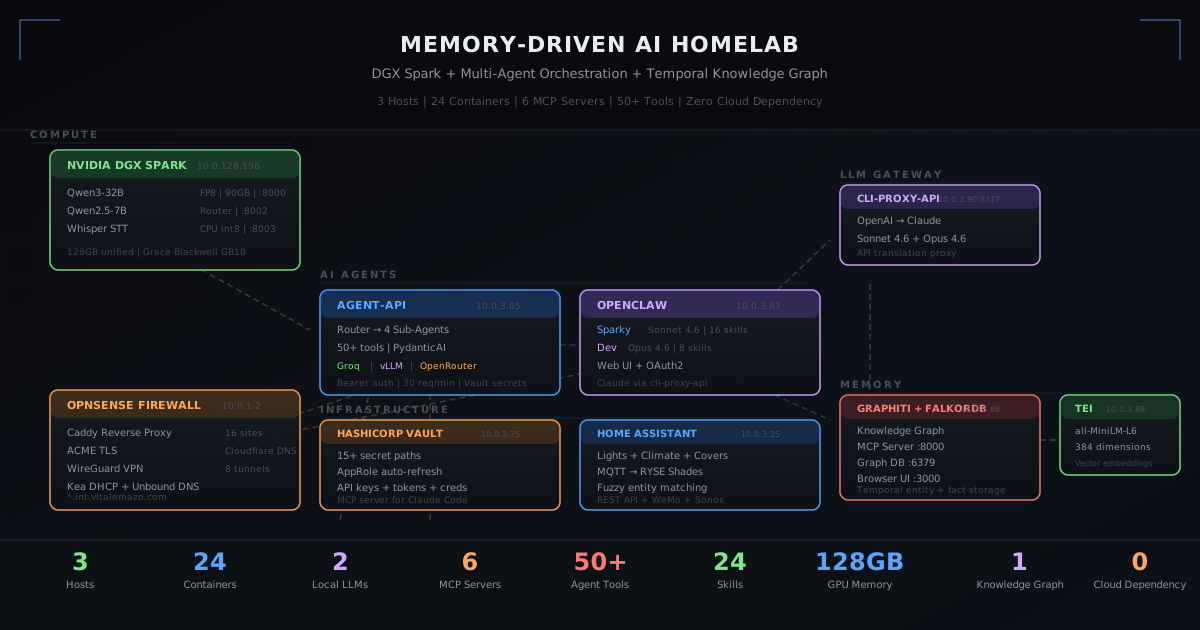
Building a Memory-Driven AI Homelab: DGX Spark, Knowledge Graphs, and 20 Containers From Soup to Nuts
A surgical deep-dive into running an NVIDIA DGX Spark with K3s, multi-agent AI orchestration, three-layer persistent memory (QMD vector search, Graphiti knowledge graph, MuninnDB cognitive memory), and 20 Docker containers on Unraid — all wired together with MCP servers, HashiCorp Vault, Cloudflare Access, and a custom API layer.
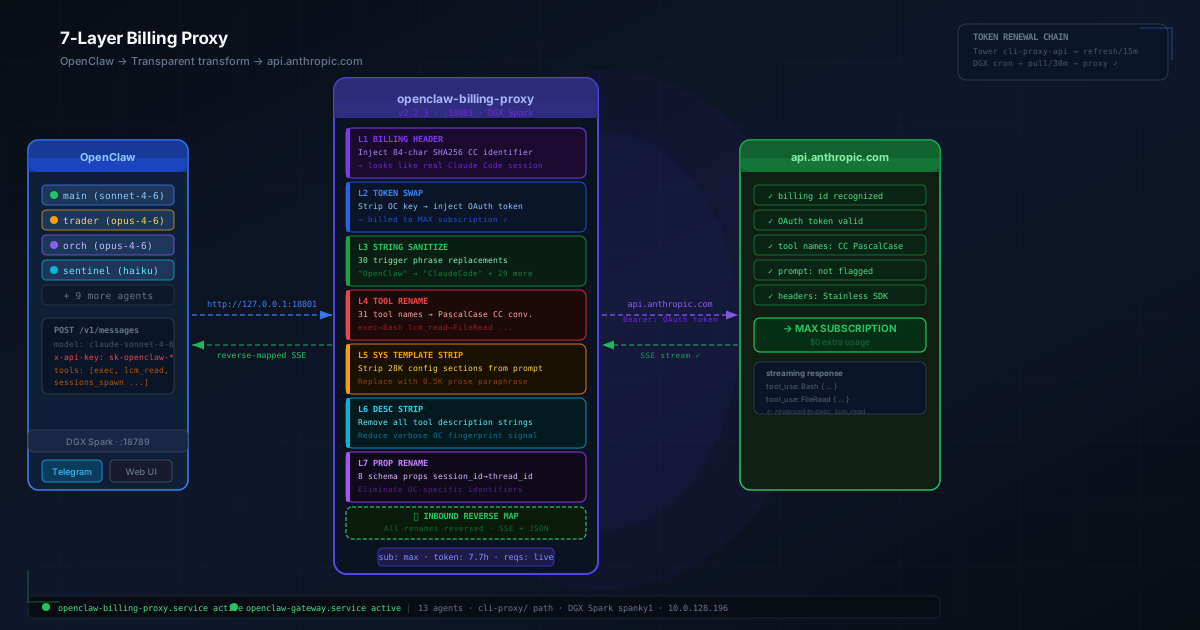
How I Kept OpenClaw Alive After Anthropic Killed Third-Party Billing
On April 4, 2026, Anthropic silently revoked subscription billing for third-party AI harnesses. Here's the full story of how I rebuilt the request pipeline — from CLI backend to a 7-layer bidirectional proxy — to keep 13 autonomous agents running on my homelab without paying Extra Usage.

AI Orchestration for Network Operations: Autonomous Infrastructure at Scale
How a single AI agent orchestrates AWS Global WAN infrastructure with autonomous decision-making, separation-of-powers governance, and 10-100x operational acceleration.
Comments & Discussion
Discussions are powered by GitHub. Sign in with your GitHub account to leave a comment.