Building a Memory-Driven AI Homelab: DGX Spark, Knowledge Graphs, and 20 Containers From Soup to Nuts
A surgical deep-dive into running an NVIDIA DGX Spark with K3s, multi-agent AI orchestration, three-layer persistent memory (QMD vector search, Graphiti knowledge graph, MuninnDB cognitive memory), and 20 Docker containers on Unraid — all wired together with MCP servers, HashiCorp Vault, Cloudflare Access, and a custom API layer.
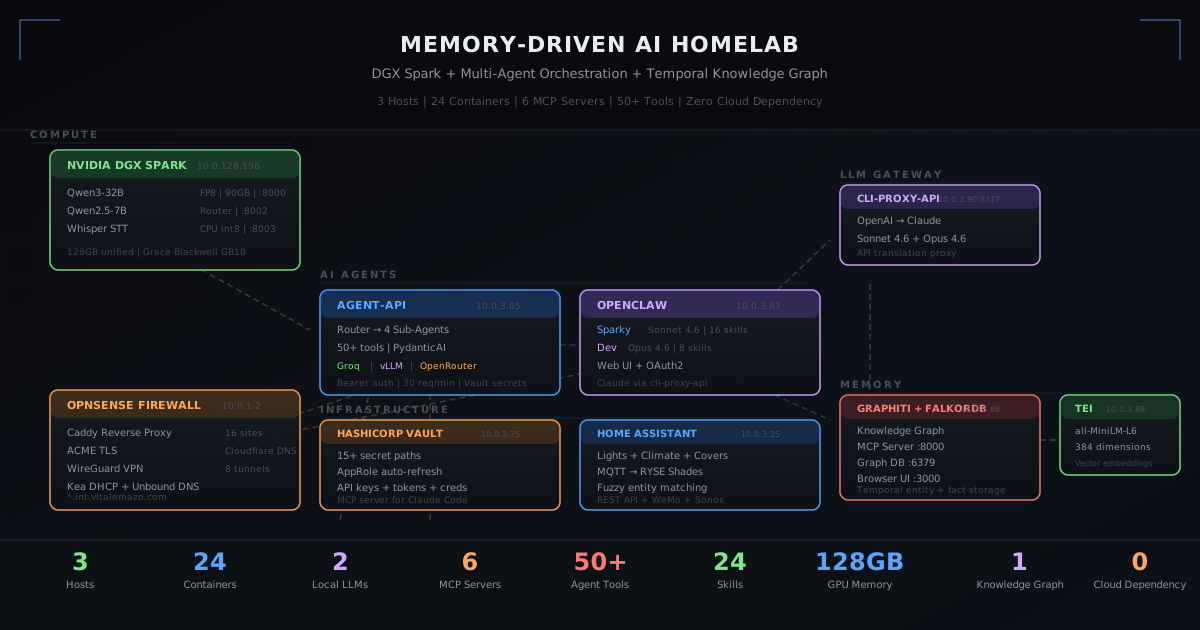
Homelab Architecture
Deep-dives into the evolving architecture of a memory-driven AI homelab
Building a Memory-Driven AI Homelab: DGX Spark, Knowledge Graphs, and 20 Containers From Soup to Nuts
Most homelabs stop at Plex and Pi-hole. This one runs an NVIDIA DGX Spark with a K3s cluster, a multi-agent AI system with four specialized sub-agents, three layers of persistent memory — a temporal knowledge graph, a cognitive memory database, and a workspace search engine running local GGUF models — 20 Docker containers on Unraid, an OPNsense firewall managing TLS termination for 16 services, and a secret management layer that would make an enterprise security team nod approvingly.
This post documents every layer of the architecture — physical hardware, network topology, container orchestration, AI agent routing, the three-tier memory system, and the MCP server mesh that ties it all together. No hand-waving. No “just deploy this Helm chart.” Every IP address, every config decision, every hack required to make Claude talk to a graph database through an OpenAI-compatible proxy.
The 30-Second Overview
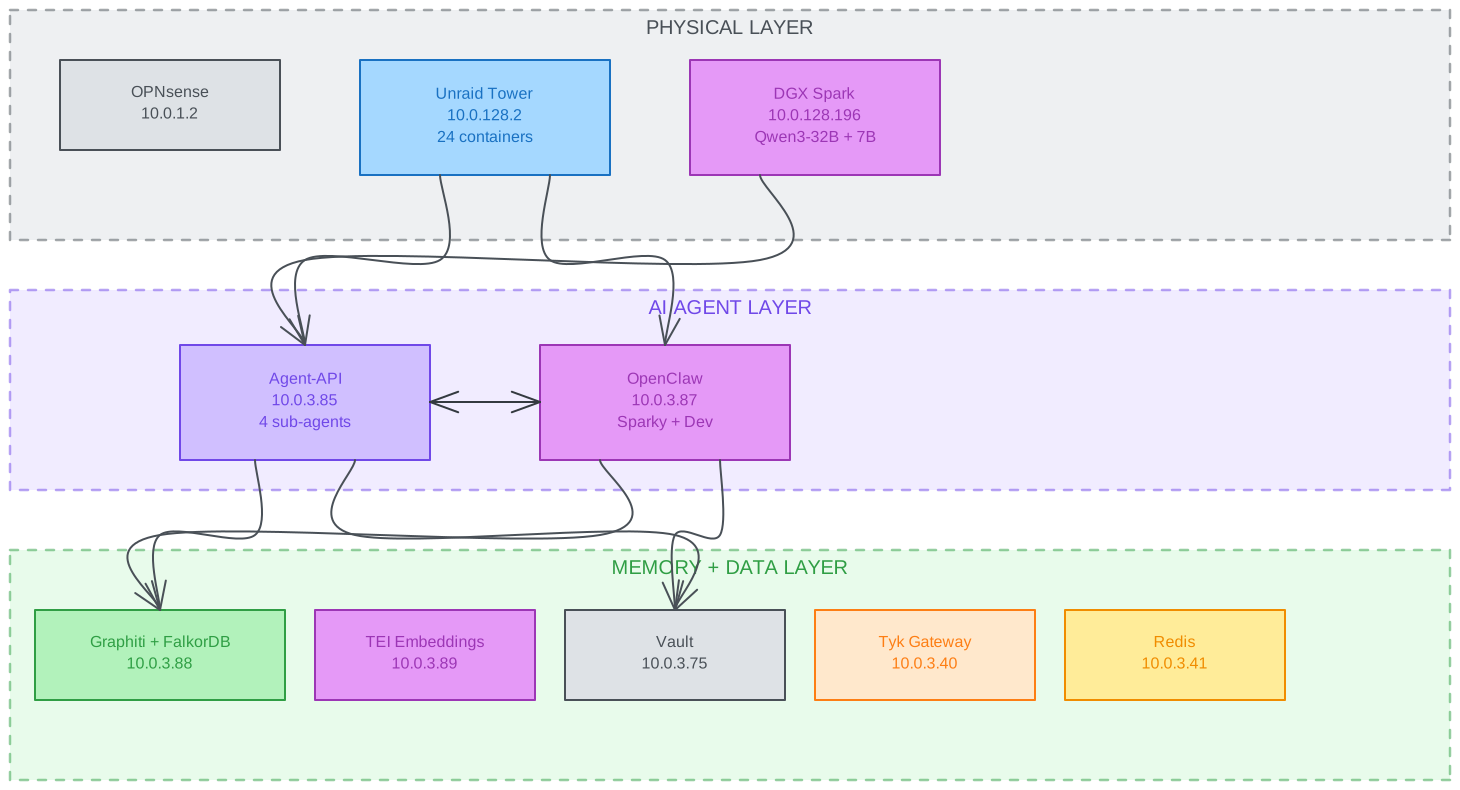
Three hosts. Twenty-one containers. Three cloud LLM providers. Three memory systems. Cloudflare Access protecting external services.
Part 1: The Hardware
NVIDIA DGX Spark — K3s Cluster and AI Compute
The DGX Spark (hostname: spanky1, IP: 10.0.128.196) is the compute backbone. It’s a Grace Blackwell GB10 with 128GB of unified memory running Ubuntu 24.04 on ARM64, now managed by a K3s cluster with ArgoCD GitOps (see Part 2 of this series for the full migration story).
The K3s cluster runs platform services — ArgoCD, Grafana, Prometheus, MetalLB, External Secrets Operator — with vLLM model deployments available as Kubernetes pods. The vLLM deployments for Qwen3-32B and Qwen2.5-7B are currently scaled to 0 replicas since the Agent-API has been simplified to use cloud-only LLM providers (Groq and OpenRouter), and OpenClaw runs entirely on Claude. The GPU is available for on-demand inference when needed — scaling up is a single kubectl scale or git commit.
Whisper remains as a systemd service handling speech-to-text on CPU with int8 quantization.
Unraid Tower — The Container Mothership
The Unraid NAS (tower.local.lan, 10.0.128.2) runs all 20 Docker containers across a br0 macvlan network. Every container gets its own IP on the 10.0.3.0/16 subnet, communicating directly at Layer 2 without NAT.
OPNsense — Firewall, DNS, TLS Termination
OPNsense (10.0.1.2) handles routing between subnets, Kea DHCPv4 for all leases, Unbound DNS for local resolution, WireGuard tunnels, and — critically — Caddy reverse proxy for TLS termination of all 16 internal services.
Every *.int.vitalemazo.com domain terminates TLS at Caddy on OPNsense using ACME certificates with Cloudflare DNS challenge. No self-signed certs. No certificate warnings.
Part 2: Network Architecture
Subnet Layout
┌─────────────────────────────────────────────┐
│              Network Topology                │
│                                              │
│  10.0.1.0/24   ─── OPNsense management      │
│  10.0.3.0/16   ─── br0 macvlan (containers) │
│  10.0.5.0/24   ─── IoT devices              │
│  10.0.128.0/24 ─── Compute (DGX Spark)      │
└─────────────────────────────────────────────┘
The br0 Macvlan — Every Container Is a First-Class Citizen
All 20 containers on Unraid share the br0 macvlan network. Each gets a unique 10.0.3.x IP address. This means:
- Containers communicate directly at Layer 2 — no Docker bridge NAT
- Each container is addressable by IP from anywhere on the network
- OPNsense firewall rules do not apply to same-subnet L2 traffic
- Security between containers is application-layer: bearer tokens, API keys, IP allowlists
This is a deliberate tradeoff. Macvlan gives clean networking and easy addressability at the cost of no implicit inter-container firewall. For a homelab where every service is authenticated, that’s acceptable.
IP Assignment Map
AI / Agent Stack                    Infrastructure
──────────────────                  ─────────────────────
10.0.3.85  Agent-API                10.0.3.75  Vault
10.0.3.88  Graphiti + FalkorDB      10.0.3.25  Home Assistant
10.0.3.89  TEI Embeddings           10.0.3.20  Mosquitto MQTT
10.0.3.90  CLI Proxy API            10.0.3.21  RYSE MQTT Bridge
10.0.3.91  MuninnDB                 10.0.3.30  Docker Registry
                                    10.0.3.31  Registry UI
                                    10.0.3.66  Cloudflared Tunnel
Media Stack
──────────────────                  K3s / Compute (DGX Spark)
10.0.3.13  Plex                     ─────────────────────
10.0.3.11  Sonarr                   10.0.128.196  K3s Node
10.0.3.10  Radarr                   10.0.128.200  ArgoCD
10.0.3.9   Prowlarr                 10.0.128.201  Grafana
10.0.3.8   Overseerr                10.0.128.203  OpenClaw
10.0.3.5   Deluge
10.0.3.12  FlareSolverr
Caddy Reverse Proxy — 16 Services, One Wildcard
Caddy on OPNsense terminates TLS for every internal service:
vault.int.vitalemazo.com       → 10.0.3.75:8200
ha.int.vitalemazo.com          → 10.0.3.25:8123
plex.int.vitalemazo.com        → 10.0.3.13:32400
agent.int.vitalemazo.com       → 10.0.3.85:8888
openclaw.int.vitalemazo.com    → 10.0.128.203:18789 (K3s)
argo.int.vitalemazo.com        → 10.0.128.200 (ArgoCD on K3s)
grafana-spark.int.vitalemazo.com → 10.0.128.201 (Grafana on K3s)
...and 10 more
External access to sensitive services (registry, ArgoCD, Grafana, DGX dashboard) goes through Cloudflare Access with Auth0 SSO. Internal LAN access terminates TLS at Caddy and relies on application-layer authentication.
Part 3: External Access — Cloudflare Access + Auth0 SSO
Early iterations of this stack used an API gateway (Tyk OSS) to consolidate routing, auth header injection, and protocol translation. As the architecture matured, that complexity proved unnecessary — Cloudflare Access handles authentication at the edge, and services are accessed directly through the Cloudflare Tunnel with per-hostname Access Applications.
The Simplified Architecture
External User → Cloudflare Tunnel → Cloudflare Access (Auth0 SSO)
  → Direct to backend service (no gateway intermediary)
Each externally-exposed service gets its own Cloudflare Access Application with Auth0 as the identity provider. Users authenticate once through Auth0’s login page (Google social connection), and Cloudflare issues a 24-hour session token. Only authenticated requests reach the backend.
Access-Protected Services
| Service | External URL | Backend | Auth |
|---|---|---|---|
| Docker Registry API | registry.vitalemazo.com | 10.0.3.30:5000 | Cloudflare Access + Auth0 |
| Docker Registry UI | registry-ui.vitalemazo.com | 10.0.3.31:80 | Cloudflare Access + Auth0 |
| ArgoCD | argo.vitalemazo.com | 10.0.128.200 | Cloudflare Access + Auth0 |
| Grafana | grafana-spark.vitalemazo.com | 10.0.128.201 | Cloudflare Access + Auth0 |
| Traefik Dashboard | traefik-spark.vitalemazo.com | 10.0.128.202 | Cloudflare Access + Auth0 |
| DGX Dashboard | dgx.vitalemazo.com | 10.0.128.196:11001 | Cloudflare Access + Auth0 |
| OpenClaw | openclaw.vitalemazo.com | 10.0.128.203:18789 (K3s) | Cloudflare Access + Auth0 |
What Got Removed
The API gateway layer (Tyk OSS + Redis) was removed entirely. Three containers eliminated:
| Removed Container | What Replaced It |
|---|---|
| Tyk Gateway (10.0.3.40) | Cloudflare Access per-hostname auth + direct tunnel routing |
| Tyk Redis (10.0.3.41) | No session storage needed — Cloudflare manages sessions at the edge |
| Agent-Chat Web UI (10.0.3.86) | OpenClaw is now the sole chat interface |
Registry authentication previously required basic auth header injection via the gateway. Now the registry runs without htpasswd — Cloudflare Access ensures only authenticated users reach it. The registry UI gets its own Access Application so both registry.vitalemazo.com and registry-ui.vitalemazo.com are independently protected.
Internal Access — OPNsense Caddy
For LAN access, nothing changed. OPNsense’s Caddy reverse proxy terminates TLS for every *.int.vitalemazo.com service using ACME certificates with Cloudflare DNS challenge. Internal access doesn’t require Auth0 — services handle their own application-layer authentication.
Part 4: The Multi-Agent AI System
Agent-API — The Brain Router
The Agent-API (10.0.3.85:8888) is a custom Python application built on PydanticAI that routes every user query to the right specialist.
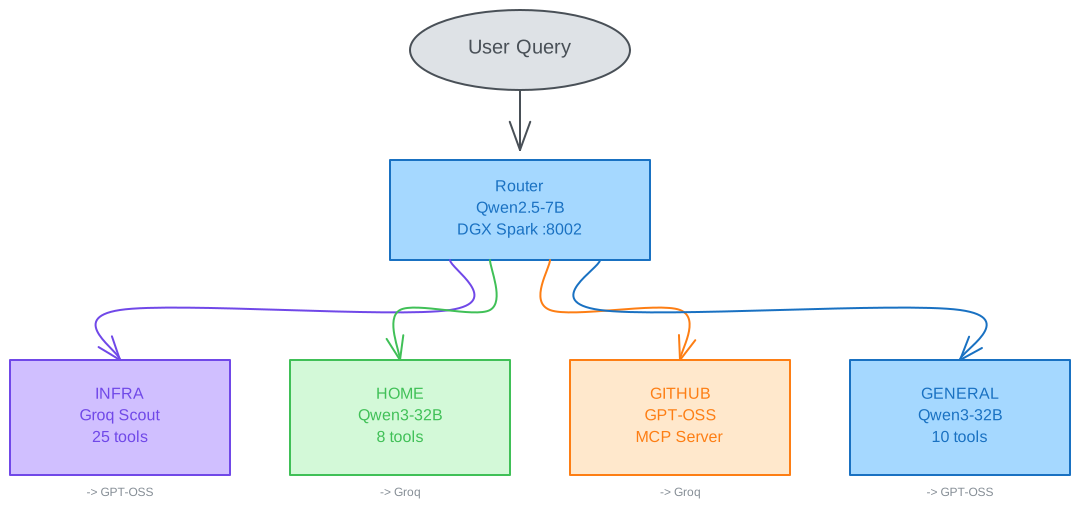
The router is keyword-based. Earlier versions used a local Qwen2.5-7B model for intent classification, but since the Agent-API no longer depends on local LLMs, the router now uses simple keyword matching — pattern rules that classify queries like “turn on the lights” to the Home agent and “what’s running on tower” to Infrastructure. This eliminates the vLLM dependency entirely and means the Agent-API starts instantly with zero GPU requirements.
Each sub-agent has a cloud-only fallback chain. If the primary model is unreachable or returns an error, the agent automatically retries with the next provider:
| Agent | Primary | Fallback | Tools |
|---|---|---|---|
| Infrastructure | Groq (Llama 4 Scout) | GPT-OSS-120B (OpenRouter) | SSH, OPNsense API (10 tools), Terraform, Docker Registry, Cloudflare DNS |
| Home | Groq (Llama 4 Scout) | GPT-OSS-120B | HA entity control, state queries, automations, history |
| GitHub | GPT-OSS-120B | Groq | GitHub MCP Server (repos, issues, PRs) — 131K context for large diffs |
| General | GPT-OSS-120B | Groq | Time, weather, ping, news, web search, Vault secrets |
The Home agent has a regex fast path. Simple commands like “turn on the kitchen light” or “close the shades” bypass the LLM entirely — a regex parser extracts the action and entity, calls Home Assistant directly, and returns in under 500ms. The LLM only activates for complex queries like “which lights have been on for more than 2 hours?”
Why Cloud-Only for Agent-API?
The original design used local Qwen3-32B for Home and General agents, with cloud providers as fallbacks. In practice, OpenClaw (running Claude) handles all conversational and complex tasks. The Agent-API primarily handles structured automation — tool calls triggered by OpenClaw’s homelab-bridge skill, cron-driven tasks, and direct API calls. For these structured tasks, Groq’s Llama 4 Scout and OpenRouter’s GPT-OSS-120B provide excellent quality with sub-5-second latency, no GPU memory consumed, and instant startup.
The DGX Spark’s GPU is now free for on-demand inference workloads via K3s rather than being permanently allocated to always-on Agent-API models.
The Monkey-Patches
When you wire together models from Groq and OpenRouter through the OpenAI SDK, you hit compatibility issues:
-
Groq returns
service_tier: "on_demand"in chat completions. The OpenAI SDK’s Pydantic model rejects this. Fix: patchChatCompletion.model_fields["service_tier"]to accept the value. -
Groq sends
nulltool arguments. GPT-OSS sends{"": {}}for parameterless tools. Neither is valid per the OpenAI spec. Fix: patchToolManager._validate_tool_argsto normalize both patterns.
These are two lines of monkey-patching that save hundreds of error-handling branches.
Authentication and Rate Limiting
Every Agent-API endpoint (except /api/health) requires a bearer token. Tokens are stored in HashiCorp Vault at secret/agent-api/keys — two keys: personal (for direct API access) and openclaw (for the OpenClaw platform).
Rate limiting: 30 requests/minute per key, maximum 2 concurrent requests per key. Sessions expire after 2 hours or 20 messages per agent history.
Part 5: OpenClaw — The Agent Platform
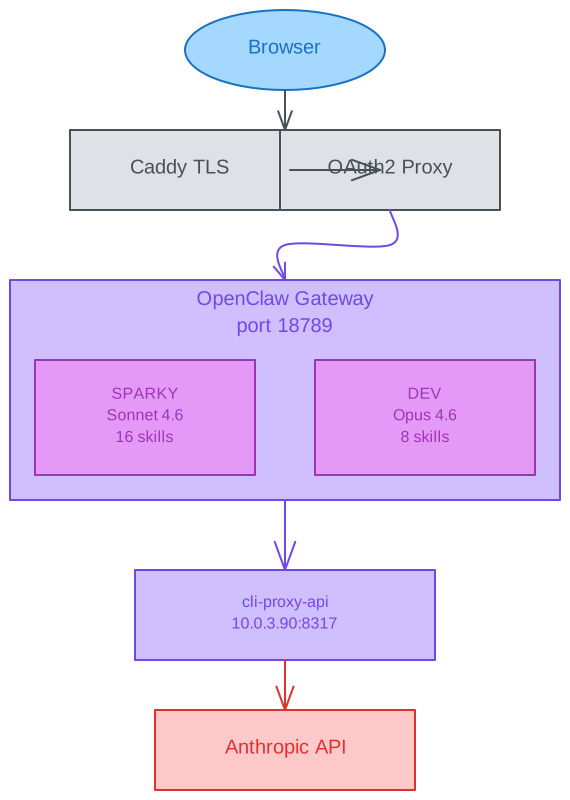
OpenClaw (10.0.128.203, K3s) is the user-facing platform and the primary chat interface for the entire homelab. It provides a web chat UI, agent lifecycle management, skill systems, cron-driven autonomous behaviors, and a three-layer memory system that gives agents persistent recall across sessions. OpenClaw is entirely Claude-powered — every conversation, every tool call, every reasoning step runs through Anthropic’s Claude API via an OpenAI-compatible proxy. External access is protected by Cloudflare Access with Auth0 SSO.
Three Agents, Different Roles
Sparky is the home and infrastructure assistant. It has 16 skills covering everything from controlling Sonos speakers and RYSE window shades to querying OPNsense firewall rules and managing Unraid containers. It runs on Claude Sonnet 4.6 for a balance of speed and capability, and has a heartbeat that triggers every 30 minutes during waking hours (8am–11pm) for proactive monitoring.
Dev is the software development agent. It runs on Claude Opus 4.6 for maximum reasoning capability and has 9 skills covering autonomous coding loops (dev-loop), project bootstrapping, Excalidraw diagram generation, knowledge graph access, GitHub integration, and Vault secrets management. Sandbox is completely off — it has full read, write, edit, and exec access to its workspace.
DevOps is the infrastructure automation agent. Also running on Claude Opus 4.6, it has full tool access and executes commands on remote nodes — including the Mac workstation via OpenClaw’s WebSocket node pairing. It handles deployments, container management, CI/CD pipelines, and infrastructure-as-code operations. Its workspace is isolated from both Sparky and Dev to prevent cross-contamination of operational and development contexts.
The Skill System
Skills are markdown files (SKILL.md) that teach agents how to use specific tools. Sparky’s 16 workspace skills:
- homelab-bridge: Proxies requests to the Agent-API for infrastructure/HA/GitHub operations
- knowledge-graph: Stores and retrieves facts from the Graphiti temporal knowledge graph
- opnsense: Queries the OPNsense REST API for firewall rules and DHCP leases
- ryse-shades: Controls RYSE SmartBridge window shades (with the workaround that
close_coverdoesn’t work — onlyset_cover_positionto 0) - vault-secrets: CRUD operations on HashiCorp Vault secrets
- sonoscli: Speaker control (play, pause, volume, grouping)
- proactive-agent: Autonomous behavior triggered by cron heartbeats
- self-improving-agent: Learns from errors and corrections to improve future responses
- caldav-calendar: CalDAV calendar integration for scheduling
- excalidraw: Architecture diagram generation as
.excalidrawfiles - unraid: Docker container management on Unraid
- weather: Weather queries and forecasts
- web-search: Internet search capabilities
- muninn-memory: MuninnDB cognitive memory — remember, recall, and reason over past experiences
- find-skills: Discovers and loads additional skills from the global skills directory
- github: GitHub repository operations
There are also 11 global skills shared across both agents covering Terraform, Kubernetes, Docker, and development patterns.
The Claude Proxy — Why OpenClaw Doesn’t Use Local LLMs
This is a common question: why doesn’t OpenClaw use local LLMs?
The Agent-API uses cloud providers (Groq Llama 4 Scout, OpenRouter GPT-OSS-120B) with a keyword-based router — no local models at all. Its sub-agents handle structured tasks (classify intent, call tool, return result) that fast cloud models handle well.
OpenClaw is different. It’s a full conversational AI platform with compaction, memory flush, multi-turn reasoning, and skill orchestration. These capabilities demand Claude-class reasoning. Both agents talk to Claude through cli-proxy-api at 10.0.3.90:8317 — an OpenAI-compatible proxy that translates requests from OpenAI’s API format to Anthropic’s native format and forwards them to Claude’s cloud API.
// OpenClaw model provider config (from openclaw.json)
{
  "providers": {
    "claude-proxy": {
      "baseUrl": "http://10.0.3.90:8317/v1",
      "api": "openai-completions",
      "models": [
        { "id": "claude-sonnet-4-6", "contextWindow": 200000, "maxTokens": 16384 },
        { "id": "claude-opus-4-6", "contextWindow": 200000, "maxTokens": 16384 }
      ]
    }
  }
}
The proxy (cli-proxy-api) is a lightweight Anthropic→OpenAI protocol translator running in its own container. OpenClaw sends requests as OpenAI-compatible chat completions; the proxy rewrites them as Anthropic messages API calls and streams the response back. No API key is shared with OpenClaw — the proxy holds the Anthropic credentials.
Part 6: The Memory Architecture — Three Layers of Persistent Recall
This is where it gets interesting. Most AI agents are stateless — every conversation starts from zero. This homelab gives agents three complementary memory systems that each solve a different recall problem. Together they provide workspace-level document search, structured knowledge with temporal relationships, and associative cognitive recall — all searchable in under 3 seconds.
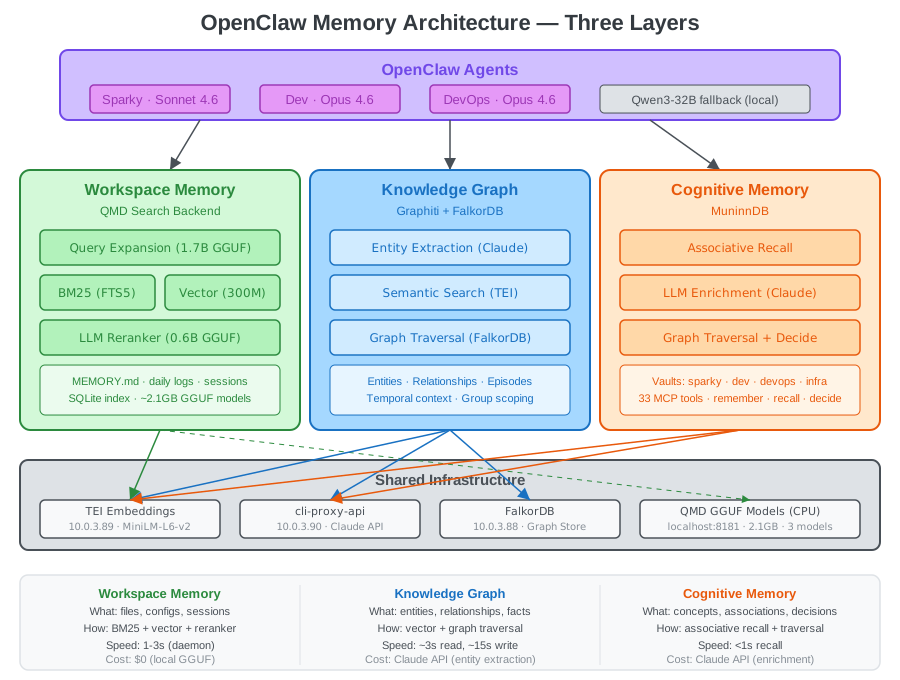
Layer 1: Workspace Memory — QMD Search Backend
Every OpenClaw agent has a workspace full of markdown files: MEMORY.md, daily logs (memory/2026-03-13.md), session transcripts, and skill definitions. The question is: how do you search them effectively?
The built-in search was basic — keyword matching against filenames. QMD (Query Markup Documents) replaces it with a full retrieval pipeline running entirely on local GGUF models inside the container. Zero API calls. Zero cost per search.
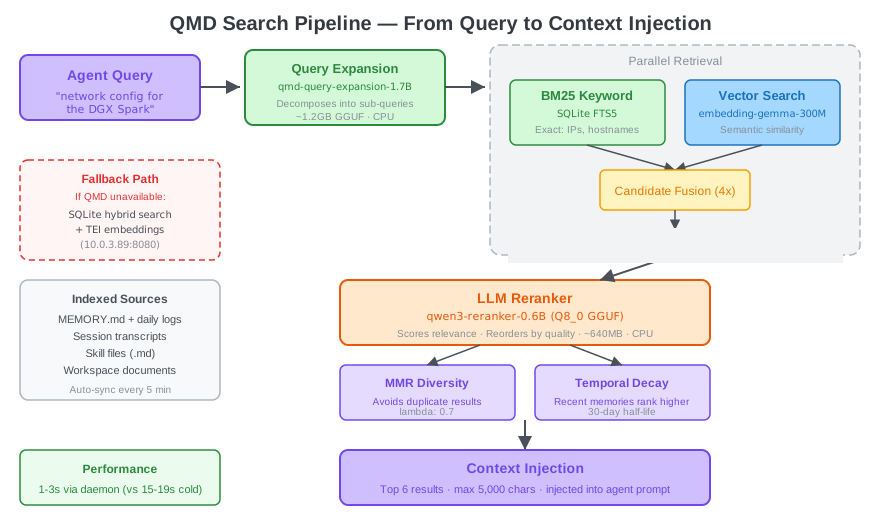
Here’s what happens when an agent searches memory:
- Query Expansion: A 1.7B parameter GGUF model (
qmd-query-expansion) decomposes the query into sub-queries. “DGX Spark network config” might expand to: “DGX Spark IP address”, “network routes compute subnet”, “vLLM configuration” - Parallel Retrieval: Two search engines run simultaneously:
- BM25 (SQLite FTS5) — keyword matching that catches exact values like IP addresses, hostnames, and config keys
- Vector Search (embedding-gemma-300M GGUF) — semantic similarity for conceptual matches
- Candidate Fusion: Results from both paths are merged with a 4x candidate multiplier — retrieve 24 candidates to select the best 6
- LLM Reranker (qwen3-reranker-0.6B, Q8_0 GGUF) — scores each candidate for relevance and reorders by quality
- MMR Diversity (lambda 0.7) — prevents returning 6 near-identical chunks from the same document
- Temporal Decay (30-day half-life) — recent memories rank higher than stale ones
- Context Injection — top 6 results, capped at 5,000 characters, injected into the agent’s prompt
The three GGUF models total ~2.1GB in RAM:
| Model | Size | Purpose |
|---|---|---|
embedding-gemma-300M | ~400MB | Vector embeddings for semantic search |
qwen3-reranker-0.6B | ~640MB | Cross-encoder relevance scoring |
qmd-query-expansion-1.7B | ~1.2GB | Query decomposition into sub-queries |
QMD runs as an MCP HTTP daemon on port 8181 inside the OpenClaw container, started by an init wrapper script that handles installation, lifecycle management, and a watchdog that auto-restarts the daemon if it crashes. The daemon avoids the 15–19 second cold-start penalty that would otherwise hit every query — with the daemon running, searches complete in 1–3 seconds.
The fallback chain: If QMD is unavailable, OpenClaw falls back to a built-in hybrid search that combines BM25 with vector similarity via the TEI embeddings server (10.0.3.89:8080). This provides most of the retrieval quality (minus the reranker and query expansion) with zero local model dependencies.
Memory Flush — Pre-Compaction Persistence
OpenClaw agents have a 200K token context window, but long sessions eventually trigger compaction — the system compresses older messages to free up space. Without intervention, valuable context gets lost.
The memory flush system intercepts this:
{
  "compaction": {
    "mode": "safeguard",
    "reserveTokensFloor": 24000,
    "memoryFlush": {
      "enabled": true,
      "softThresholdTokens": 6000,
      "systemPrompt": "Session nearing compaction. Store durable memories now.",
      "prompt": "Write any lasting notes, decisions, or discovered facts to memory/YYYY-MM-DD.md."
    }
  }
}
When a session reaches ~170K tokens (200K minus the 24K reserve minus the 6K soft threshold), the agent receives a system prompt telling it to save important context to disk before compaction erases it. These saved notes become searchable by QMD in the next sync cycle (every 5 minutes).
Session Indexing — Past Conversations Are Searchable
Every past conversation transcript is indexed by QMD. An agent can recall what was discussed three weeks ago — “what did we decide about the MetalLB IP pool?” — because the session transcripts are part of the search corpus. Session retention is set to 90 days.
Layer 2: Knowledge Graph — Graphiti + FalkorDB
While QMD searches documents, Graphiti extracts and stores structured knowledge: entities, relationships, and temporal facts.
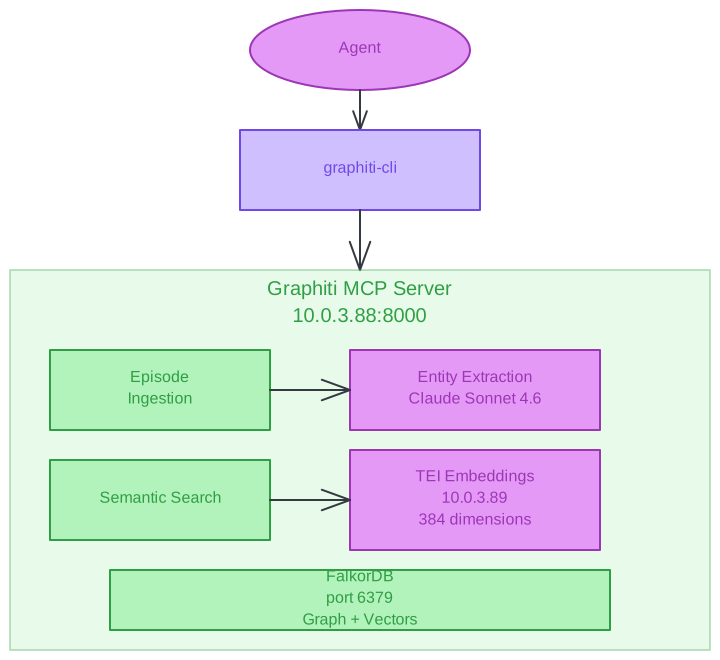
When an agent learns something important — a deployment outcome, a user preference, an infrastructure fact — it calls graphiti-cli add with a text description and a group ID.
graphiti-cli add "Deployed Graphiti at 10.0.3.88 with FalkorDB \
  and TEI embeddings on March 6th 2026" infra
Here’s what happens in the next ~15 seconds:
- Episode creation: The text is stored as an episode in FalkorDB with a timestamp and group ID
- Entity extraction: Claude Sonnet 4.6 analyzes the text and extracts entities with types:
Graphiti→ OrganizationFalkorDB→ Organization10.0.3.88→ LocationTEI embeddings→ TopicMarch 6th 2026→ Event
- Relationship extraction: Claude identifies relationships between entities:
Graphiti—deployed_at→10.0.3.88Graphiti—uses→FalkorDBGraphiti—uses→TEI embeddings
- Embedding generation: Each entity and relationship gets a 384-dimensional vector from the TEI server
- Graph storage: Nodes, edges, and vectors are persisted in FalkorDB
When an agent needs to recall information:
graphiti-cli search-facts "what database does Graphiti use" infraThis performs both semantic search (vector similarity via TEI embeddings) and graph traversal (following relationships in FalkorDB) to return relevant facts with temporal context.
Entity Types
The knowledge graph automatically categorizes extracted entities:
| Type | Description | Examples |
|---|---|---|
| Preference | User choices and opinions | “Prefers dark mode”, “Uses keyword router for Agent-API” |
| Requirement | Needs and specs | “Must support 200K context”, “Needs FP8 quantization” |
| Procedure | Workflows and commands | “Delete wlan0 route after reboot”, “Deploy with docker run” |
| Location | Physical and network locations | “10.0.3.88”, “tower”, “DGX Spark” |
| Event | Deployments, changes, incidents | “Deployed March 6th”, “Fixed embedder base_url” |
| Organization | Services and systems | “FalkorDB”, “OpenClaw”, “Graphiti” |
| Document | Files and configs | “config.yaml”, “deploy.sh”, “SOUL.md” |
| Topic | Concepts and technologies | “Temporal knowledge graph”, “macvlan networking” |
Group IDs — Cross-Agent Memory
All three agents read and write to the same graph but tag episodes with different group IDs:
sparky— Sparky’s observations and decisionsdev— Dev’s coding context and project knowledgedevops— DevOps deployment and infrastructure knowledgeinfra— Shared infrastructure facts
This means Dev can recall what Sparky learned about a network issue, DevOps can reference code decisions Dev made, and Sparky can look up what DevOps deployed last Tuesday. The knowledge graph is shared; the group IDs provide attribution and scoping for search.
The Patches That Made It Work
Graphiti’s MCP server is designed for native OpenAI APIs. Making it work with Claude through an OpenAI-compatible proxy required patching three Python files.
Problem 1: Embeddings routing. Graphiti uses the OpenAI SDK for embeddings, which picks up the OPENAI_BASE_URL environment variable. That points at the Claude proxy (10.0.3.90:8317), but embeddings need to go to the TEI server (10.0.3.89:8080). The factory code doesn’t pass base_url separately.
Fix: Patched factories.py to extract api_url from the embedder’s provider config and pass it explicitly to OpenAIEmbedderConfig(base_url=...).
Problem 2: Structured output validation. Graphiti uses OpenAI’s responses.parse() for structured output — schema validation happens inside the SDK before our code runs. Claude returns JSON wrapped in markdown code fences (```json ... ```), wrong field names (entities instead of extracted_entities), and bare lists instead of objects. All of these fail SDK validation.
Fix: Rewrote openai_client.py to use chat.completions.create() instead of responses.parse(). The JSON schema gets injected as text in the system prompt. A custom response parser strips code fences, remaps field names using fuzzy matching, and auto-wraps bare lists into the expected object structure by inspecting the Pydantic response model’s field types.
Problem 3: Small model fallback. Graphiti uses a “small model” (defaulting to gpt-4.1-mini) for lightweight operations. The Claude proxy doesn’t serve that model.
Fix: Patched factories.py to detect non-OpenAI model names and set small_model = config.model — use Claude for everything.
These three patched files are bind-mounted into the container, overriding the originals at runtime.
Layer 3: Cognitive Memory — MuninnDB
While QMD searches files and Graphiti stores structured facts, MuninnDB (10.0.3.91) provides associative cognitive memory — the kind of recall that mimics how humans connect ideas.
MuninnDB is a custom memory database built from a Rust binary with 33 MCP tools. Each agent has its own vault (namespace) — sparky, dev, devops, infra — with separate API keys stored in HashiCorp Vault.
The key operations:
| Tool | Purpose |
|---|---|
muninn_remember | Store a memory with automatic embedding and LLM enrichment |
muninn_recall | Retrieve memories by associative similarity |
muninn_decide | Ask MuninnDB to reason over stored memories and make a recommendation |
muninn_traverse | Walk the memory graph following conceptual connections |
muninn_remember_tree | Store a hierarchical memory structure |
When an agent calls muninn_remember, the text is:
- Embedded via TEI (10.0.3.89:8080) for vector search
- Enriched by Claude Sonnet 4.6 (via cli-proxy-api at 10.0.3.90:8317) — the LLM adds metadata, tags, and conceptual connections
- Stored in MuninnDB’s internal graph with bidirectional associations
The muninn_decide tool is unique — you ask it a question like “should we use Qwen3 or Claude for this task?” and it reasons over all relevant stored memories to produce a recommendation. This is cognitive recall, not just search.
MuninnDB runs on a custom Debian container (the binary is glibc-linked — Alpine doesn’t work). A socat layer forwards traffic from the container IP to the 127.0.0.1-bound binary:
Container IP (10.0.3.91)         Internal
─────────────────────            ─────────
:8475 (REST)   → socat →  127.0.0.1:8474
:8476 (Web UI) → socat →  127.0.0.1:8476
:8750 (MCP)    → native   0.0.0.0:8750
How the Three Layers Work Together
Each memory layer answers a different question:
| Question | Layer | Example |
|---|---|---|
| “What’s in my notes about X?” | QMD (workspace) | “What did I write about the MetalLB IP pool config?” |
| “What are the facts about X?” | Graphiti (knowledge) | “What IP is Graphiti deployed on?” |
| “What should I do about X?” | MuninnDB (cognitive) | “Based on past deployments, should I use rolling or blue-green?” |
They don’t compete — they complement. An agent might:
- QMD finds the session transcript where you discussed DNS configuration
- Graphiti retrieves the structured fact that OPNsense runs Unbound DNS at 10.0.1.2
- MuninnDB recalls that the last time someone changed DNS config without testing, resolution broke for 2 hours
The workspace memory runs automatically on every message (injected into the prompt). The knowledge graph and cognitive memory are invoked explicitly by the agent via skill-defined tools when it needs structured facts or associative reasoning.
Part 7: Secret Management with HashiCorp Vault
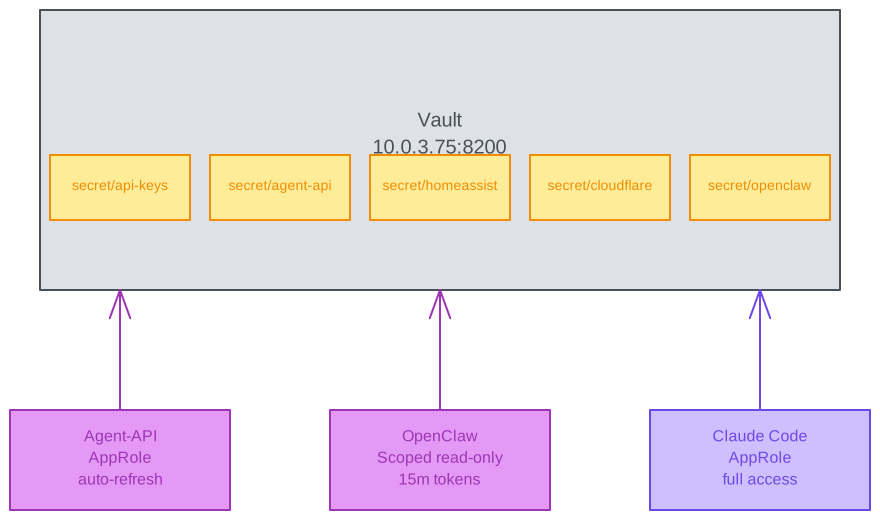
Every API key, token, and credential in this infrastructure lives in HashiCorp Vault (10.0.3.75).
No Hardcoded Secrets
The Agent-API authenticates to Vault using AppRole with automatic token refresh. At startup, it exchanges a Role ID and Secret ID for a renewable token (1-hour TTL, extendable to 4 hours). Every API key — Groq, OpenRouter, GitHub, Home Assistant, OPNsense, Cloudflare — is fetched from Vault at runtime.
OpenClaw gets scoped access through a special endpoint (/api/internal/token) on the Agent-API that mints short-lived Vault tokens with a readonly policy and 15-minute TTL. This endpoint is IP-restricted to OpenClaw’s K3s pod network.
Vault MCP Server
Claude Code (my local CLI) connects to Vault through an MCP server — a Go binary that provides read_secret, write_secret, list_secrets, and delete_secret tools, plus full PKI certificate management. This means I can say “store this API key in Vault” in a Claude Code session, and it happens without me ever touching the Vault UI.
Part 8: Home Automation Integration
Home Assistant + MQTT + RYSE Shades

The Home Agent has 8 tools for interacting with Home Assistant via its REST API. The standout is ha_control — a combined find-and-control tool that uses fuzzy entity matching with difflib.SequenceMatcher. You can say “turn on the kitchen light” even if the entity is named light.kitchen_main_overhead — it’ll find the closest match.
The RYSE SmartBridge integration deserves special mention. The bridge controls motorized window shades but has a quirk: the standard close_cover service doesn’t work. The agent has learned (and stored in the knowledge graph) that only set_cover_position with position 0 reliably closes the shades. This is exactly the kind of operational knowledge that the temporal knowledge graph preserves across sessions.
Part 9: MCP Servers — The Connective Tissue
Model Context Protocol (MCP) servers provide tool interfaces that AI agents can discover and use. Seven MCP servers are configured across the system:
| Server | Runtime | Purpose |
|---|---|---|
| Vault | Go binary | Secret CRUD, PKI certificate management |
| SSH | Native binary | Remote command execution on known hosts |
| Browser | Native binary | Web page interaction and automation |
| GitHub | Stdio (in Agent-API) | Repository, issue, and PR management |
| Graphiti | HTTP (10.0.3.88:8000) | Knowledge graph read/write via MCP protocol |
| MuninnDB | HTTP (10.0.3.91:8750) | Cognitive memory — 33 tools including remember, recall, decide, traverse |
| QMD | HTTP (localhost:8181) | Workspace memory search — BM25 + vector + reranker pipeline |
OPNsense management is handled via SSH rather than a dedicated MCP server — the OPNsense REST API auth proved unreliable, so direct SSH with key-based authentication is the production approach. Sparky’s opnsense skill wraps SSH commands to query firewall rules, DHCP leases, and configuration.
MCP Transport: Stdio vs HTTP
Most MCP servers use stdio transport — they run as child processes that communicate over stdin/stdout. This is fine for single-client use (Claude Code on my Mac).
Graphiti uses Streamable HTTP transport — it’s a network service at 10.0.3.88:8000/mcp that multiple clients can connect to simultaneously. The graphiti-cli shell script handles the MCP session lifecycle: initialize a session (get a session ID from the response headers), call tools with that session ID, parse JSON-RPC responses.
# Simplified graphiti-cli flow
SESSION_ID=$(curl -si -X POST "$URL" \
  -d '{"jsonrpc":"2.0","method":"initialize",...}' \
  | grep -i "mcp-session-id:" | sed "s/^[^:]*: *//" | tr -d "\r\n")

curl -X POST "$URL" \
  -H "mcp-session-id: $SESSION_ID" \
  -d '{"jsonrpc":"2.0","method":"tools/call","params":{"name":"add_episode",...}}'
Part 10: The Complete Data Flow
Here’s what happens when you type “Remember that the DGX Spark runs Qwen3-32B at 10.0.128.196” into the OpenClaw chat:
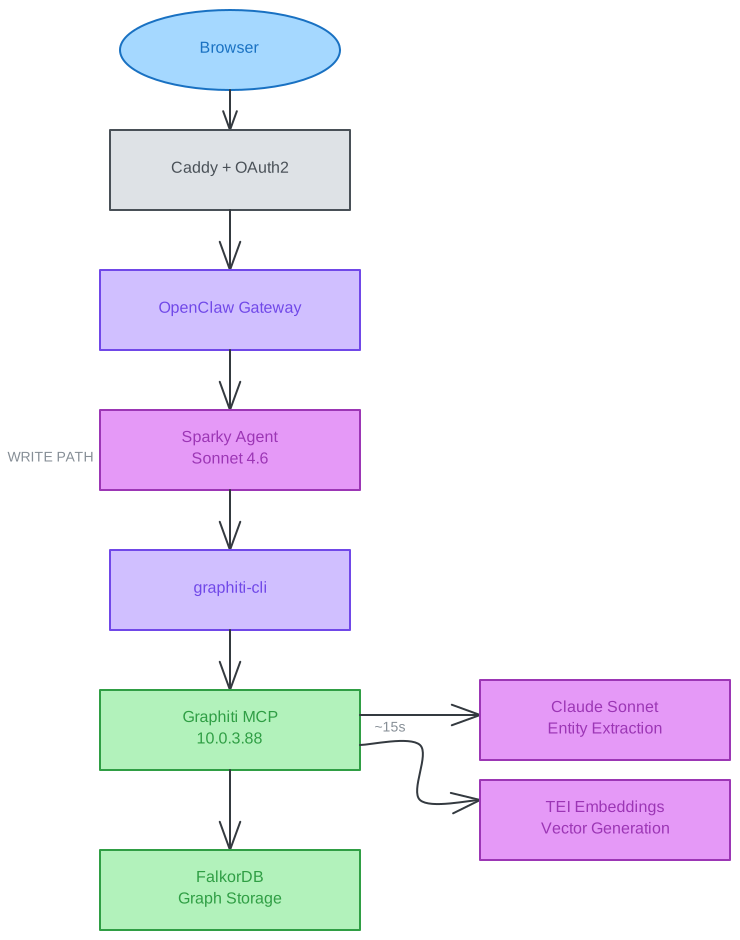
Storage path (write): Browser → Cloudflare Access → Caddy (TLS) → OpenClaw Gateway → Sparky Agent → graphiti-cli → Graphiti MCP Server → Entity extraction (Claude Sonnet 4.6) + Embedding (TEI) → FalkorDB. ~15 seconds for entity extraction and storage.
Recall path (read): Browser → Cloudflare Access → Caddy → OpenClaw → Sparky → graphiti-cli → Graphiti MCP → TEI (embed query) → FalkorDB (vector similarity + graph traversal) → facts returned to Sparky. Under 3 seconds.
The round-trip for recall is under 3 seconds. Storage takes ~15 seconds due to the entity extraction LLM calls.
The Invisible Memory Search
What’s less visible is what happens on every single message. Before the agent even sees your query, QMD runs a memory search against the workspace:
Your message arrives
  ├── QMD search triggers (automatic, every message)
  │   ├── Query expansion → 3 sub-queries
  │   ├── BM25 + Vector search → 24 candidates
  │   ├── Reranker → top 6 results
  │   └── 5,000 chars injected into prompt
  │
  ├── Agent receives: your message + memory context
  │   ├── May invoke Graphiti (explicit): "what IP is X on?"
  │   ├── May invoke MuninnDB (explicit): "recall past decisions about X"
  │   └── Responds with full context from all layers
  │
  └── If near compaction threshold:
      └── Memory flush → saves durable notes to disk
          └── QMD indexes them within 5 minutes
The workspace memory is passive — it enriches every interaction automatically. The knowledge graph and cognitive memory are active — the agent calls them when it needs structured facts or associative reasoning. This layered approach means the agent always has relevant workspace context, and can pull in deeper knowledge on demand.
Part 11: What This Enables
This isn’t infrastructure for its own sake. Here’s what the stack actually does in daily use:
“Turn off the office lights and close the shades” → Home Agent regex fast-path → Home Assistant → lights off in 500ms, then set_cover_position to 0 via RYSE MQTT bridge.
“What containers are running on tower?” → Infrastructure Agent → SSH to tower → docker ps → formatted response with status, IPs, and uptime.
“Create a WireGuard peer for my new laptop” → Infrastructure Agent → OPNsense API → new peer config generated and displayed.
“Review the latest PR on the agent-api repo” → GitHub Agent → GitHub MCP Server → PR diff fetched (131K context window handles large diffs) → detailed review with line-specific comments.
“What did we deploy last week?” → Sparky → Knowledge Graph → temporal query across episodes → list of deployments with dates, IPs, and outcomes.
“Remember that the wlan0 route on tower breaks DGX connectivity after reboot” → Knowledge Graph → stored as Procedure entity → recalled automatically next time DGX connectivity fails.
“Should we use blue-green or rolling deployment for this?” → DevOps → MuninnDB decide → reasons over past deployment memories → recommendation with rationale.
“What did we discuss about the DNS config last week?” → QMD workspace search → finds the session transcript → agent summarizes the relevant conversation with full context.
The three-layer memory system is the force multiplier. Without it, every session starts cold. With it, the agents accumulate operational knowledge that compounds over time — workspace notes via QMD, structured facts via Graphiti, and associative reasoning via MuninnDB. Three months from now, these agents will know the history of every deployment, every workaround, every preference — without anyone maintaining a wiki.
Part 12: The DGX Spark GPU — From Always-On LLMs to On-Demand Compute
The most significant architectural shift since the initial build is how the DGX Spark’s GPU is used. Originally, Qwen3-32B and Qwen2.5-7B consumed 85% of the 128GB unified memory 24/7 as always-on systemd services. After the K3s migration and the Agent-API’s shift to cloud-only providers, the GPU is now entirely free — available on-demand for any workload that needs it.
What Containers Can Use the GPU
The K3s cluster’s GPU Operator exposes 4 time-sliced GPU instances via nvidia.com/gpu resource requests. Any pod that requests GPU gets scheduled:
| Workload | GPU Need | Status |
|---|---|---|
| vLLM Qwen3-32B | 70% memory (~90GB) | K8s deployment at 0 replicas — scale up with one git commit |
| vLLM Qwen2.5-7B | 15% memory (~19GB) | K8s deployment at 0 replicas — available for classification tasks |
| OpenClaw | None (CPU-only Node.js) | Running on K3s — colocated with TEI/QMD/vLLM for cluster-internal latency |
| TEI Embeddings | Optional (CPU currently) | Candidate for GPU acceleration if embedding latency becomes a bottleneck |
| Batch inference | Variable | On-demand fine-tuning, evaluation, or batch processing jobs |
Why Colocate on K3s?
OpenClaw previously ran on Unraid tower (10.0.3.87) as a Docker container. Its hot-path dependencies — vLLM (when active), QMD search, and TEI embeddings — all run on the DGX Spark K3s cluster (10.0.128.196). Every LLM call, memory search, and embedding lookup was crossing the network twice. Moving OpenClaw to K3s turned these into cluster-internal service calls:
Before (cross-network):
  OpenClaw (10.0.3.87) → TCP proxy → vLLM (10.0.128.196:8000)
  OpenClaw (10.0.3.87) → HTTP → TEI (10.0.3.89:8080)

After (cluster-internal, current):
  OpenClaw pod → vllm.vllm.svc.cluster.local:8000
  OpenClaw pod → tei-embeddings.tei.svc.cluster.local:8080
  OpenClaw pod → qmd-search.qmd.svc.cluster.local:8181
OpenClaw runs as an ArgoCD-managed deployment on K3s — namespace, deployment, service, and external-secret manifests committed to the gitops repo. OpenClaw data stays on tower via NFS mount. The Cloudflare Tunnel ingress points to a MetalLB LoadBalancer IP (10.0.128.203).
Services that remain on tower (Agent-API, Graphiti, MuninnDB, Vault) are reachable from the K3s pod via OPNsense inter-subnet routing. Only the hot-path dependencies benefit from colocation.
Lessons Learned
Cloud LLMs won the Agent-API battle. The original design used Qwen3-32B locally for Home and General agents, with cloud providers as fallbacks. In practice, the local models consumed 85% of the DGX Spark’s GPU memory 24/7 while handling tasks that Groq and OpenRouter serve equally well in under 5 seconds. Removing the local LLM dependency freed the GPU for on-demand workloads, eliminated the 5-minute vLLM startup blocking Agent-API availability, and simplified the router from a model-based classifier to keyword matching. OpenClaw runs entirely on Claude Sonnet 4.6 and Opus 4.6 through the cli-proxy-api translator. The knowledge graph’s entity extraction and MuninnDB’s memory enrichment also use Claude. The takeaway: don’t permanently allocate expensive GPU memory to always-on services when cloud APIs provide equivalent quality for structured tasks at negligible cost.
Macvlan networking is worth the tradeoff. Clean IPs, no NAT, easy debugging. The loss of inter-container firewall rules is acceptable when every service authenticates at the application layer.
MCP servers are the right abstraction. Instead of building custom integrations for every tool, MCP provides a standard interface that any LLM client can discover and use. Adding a new capability means deploying one MCP server, not modifying every agent.
Patching upstream code is sometimes the only option. When the Graphiti image assumes native OpenAI APIs and you’re running Claude through a proxy, you patch. Three bind-mounted Python files is less maintenance than a fork.
Push authentication to the edge. Early iterations used API gateways and OAuth2 proxies for service authentication — each adding containers and complexity. Cloudflare Access with Auth0 SSO replaced all of that by handling authentication at the tunnel edge. Each service gets a per-hostname Access Application managed through Terraform. No gateway containers, no proxy chains, no htpasswd files. Adding auth to a new service is a Terraform resource, not a Dockerfile.
Vault from day one. Every secret in one place with audit logs and short-lived tokens. The initial setup takes an afternoon. The payoff is never wondering where an API key lives or whether it’s been rotated.
Memory needs layers, not one system. A knowledge graph is great for structured facts (“what IP is X on?”) but terrible for searching through session transcripts. A vector search engine finds similar documents but can’t reason over past decisions. MuninnDB’s associative recall captures the intuitive connections that neither structured search nor similarity matching can express. The three layers aren’t redundant — they solve fundamentally different recall problems.
Local GGUF models are viable for retrieval. QMD’s three models (2.1GB total) run on CPU with 1–3 second latency. That’s fast enough for every-message memory injection and cheap enough to run on a NAS. The reranker alone — a 0.6B parameter model — dramatically improves result quality over raw BM25+vector fusion. Running retrieval locally means memory search costs nothing per query, which matters when it runs on every single message.
The Numbers
| Metric | Value |
|---|---|
| Physical hosts | 3 (OPNsense, Unraid, DGX Spark) |
| Docker containers (Unraid) | 20 |
| K8s namespaces (DGX Spark) | 7 |
| K8s pods (DGX Spark) | ~18 (platform services, vLLM at 0 replicas) |
| Local GGUF models | 3 (QMD: embedding 300M, reranker 0.6B, expansion 1.7B) |
| Cloud LLM providers | 3 (Groq, OpenRouter, Anthropic) |
| AI sub-agents | 4 (infra, home, github, general) |
| OpenClaw agents | 3 (Sparky on Sonnet 4.6, Dev on Opus 4.6, DevOps on Opus 4.6) |
| Memory systems | 3 (QMD workspace, Graphiti knowledge graph, MuninnDB cognitive) |
| Sparky skills | 16 workspace + 11 global |
| Dev skills | 9 workspace + 11 global |
| MCP servers | 7 |
| Cloudflare Access applications | 7 (registry, registry-ui, ArgoCD, Grafana, Traefik, DGX, OpenClaw) |
| Caddy reverse proxy entries | 21 |
| Vault secret paths | 15+ |
| Knowledge graph entity types | 8 |
| MuninnDB vaults | 4 (sparky, dev, devops, infra) |
| MuninnDB MCP tools | 33 |
| Total agent tools | 80+ |
| GPU memory allocated | 0 (available on-demand via K3s) |
| QMD GGUF models in RAM | ~2.1GB |
Three hosts. Twenty-one containers. Eighteen Kubernetes pods. Eighty tools. Three memory systems. GPU on-demand. Zero manual memory management.
The agents remember. The graph grows. The memories compound. The homelab learns.
Related Posts
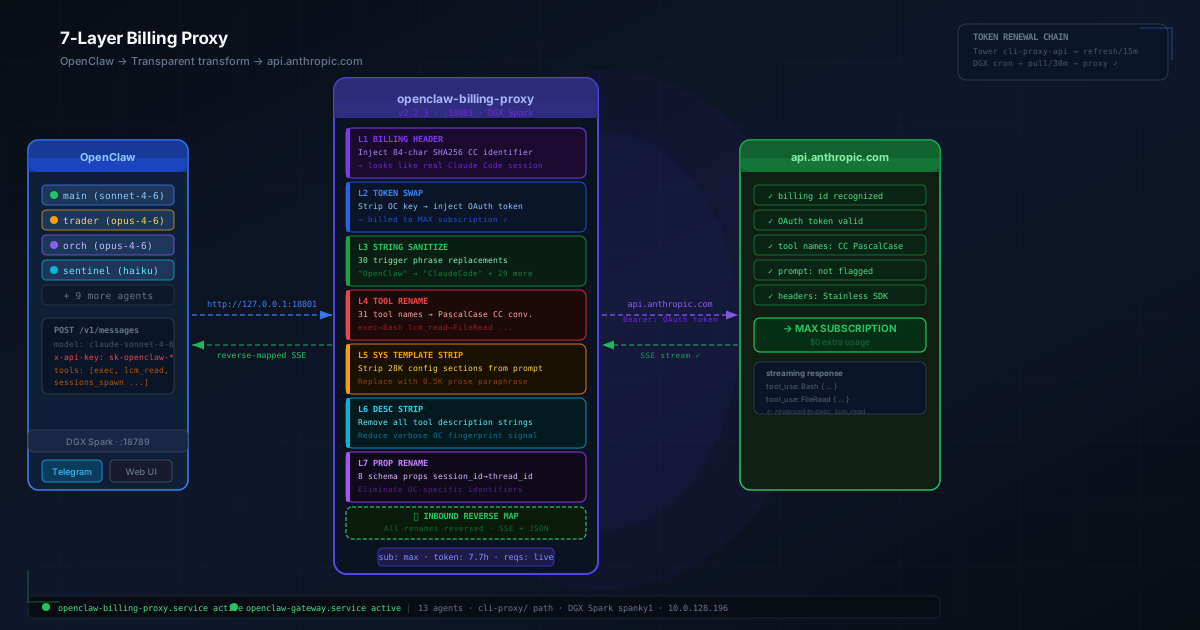
How I Kept OpenClaw Alive After Anthropic Killed Third-Party Billing
On April 4, 2026, Anthropic silently revoked subscription billing for third-party AI harnesses. Here's the full story of how I rebuilt the request pipeline — from CLI backend to a 7-layer bidirectional proxy — to keep 13 autonomous agents running on my homelab without paying Extra Usage.
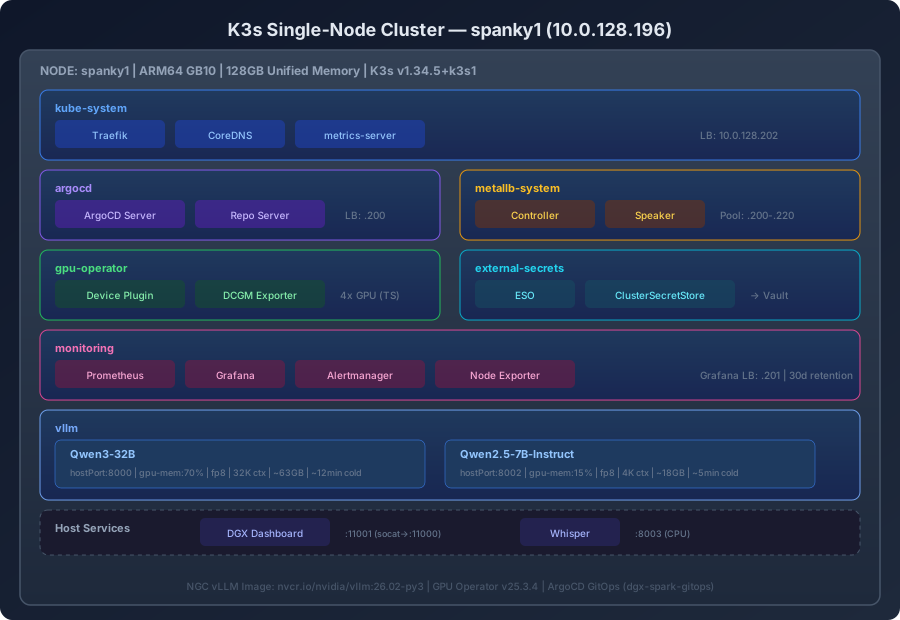
From Systemd to Kubernetes: Running AI Workloads on K3s with ArgoCD GitOps
Migrating two vLLM models from bare systemd services to a production K3s cluster on the DGX Spark — with NVIDIA GPU Operator time-slicing, ArgoCD app-of-apps GitOps, kube-prometheus-stack monitoring, and Cloudflare Access + Auth0 SSO protecting five web dashboards.
AI Orchestration for Network Operations: Autonomous Infrastructure at Scale
How a single AI agent orchestrates AWS Global WAN infrastructure with autonomous decision-making, separation-of-powers governance, and 10-100x operational acceleration.
Comments & Discussion
Discussions are powered by GitHub. Sign in with your GitHub account to leave a comment.